
Key Takeaways
- The Haoqi Cheetah dashboard provides real-time data such as speed, wattage, and battery status, which is crucial for enhancing your cycling experience.
- Understanding the dashboard interface allows you to customize your ride and make informed decisions about speed and energy use.
- Real-time data accessibility on the dashboard enhances safety by offering immediate feedback on your riding conditions.
- The dashboard features include a speed and wattage display, battery voltage, odometer tracking, and a temperature display.
- Customizing your dashboard settings can optimize your viewing experience, ensuring a safer and more enjoyable ride.
Haoqi Cheetah Dashboard Overview
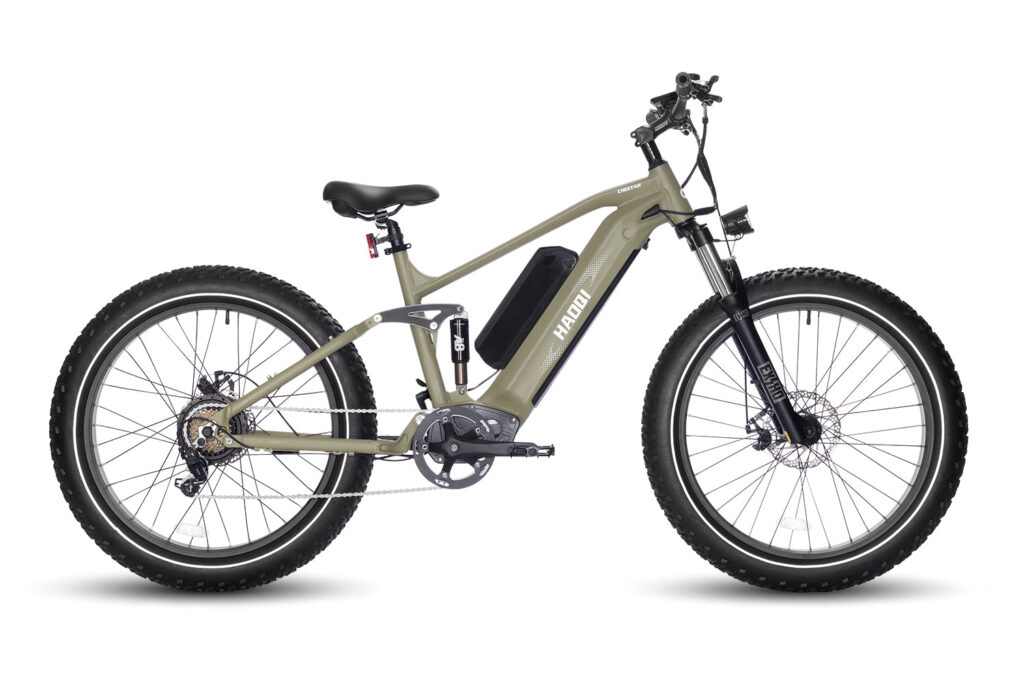
“HAOQI Cheetah Full Suspension Electric Bike” from haoqiebike.com
When you’re riding the Haoqi Cheetah, the dashboard becomes your best friend. It acts like the control center of a spaceship, giving you all the information you need to have a great ride. This dashboard is designed to be intuitive, making it easy for you to understand and use, even if you’re new to electric bikes.
Understanding the Dashboard Interface
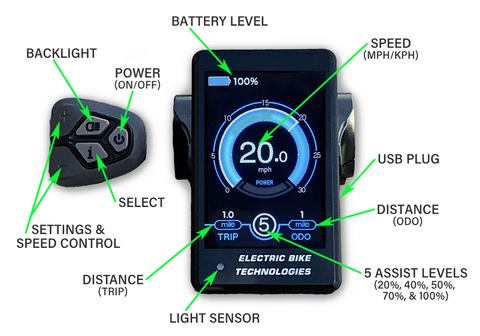
The dashboard interface on the Haoqi Cheetah is straightforward yet packed with valuable information. It displays everything from your current speed to how much battery you have left. The screen is designed to be easily readable, even in bright sunlight, so you won’t have to squint or stop to check your stats.
Each piece of information is laid out clearly. For example, the speedometer is prominently displayed at the top, making it easy to glance down and see how fast you’re going. Meanwhile, the wattage output, which tells you how much power the bike’s motor is using, is located just below. This setup helps you keep track of your ride without getting distracted.
Importance of Real-Time Data Accessibility
Real-time data accessibility is a game-changer for cyclists. Having instant access to information like speed, wattage, and battery life allows you to make quick decisions. For instance, if you notice your battery is running low, you can adjust your speed or pedal more to conserve energy.
Moreover, the dashboard’s real-time data improves safety. By knowing your exact speed and the current wattage output, you can ensure you’re riding within safe limits. It also helps you anticipate when you might need to slow down or stop, reducing the risk of accidents. For additional safety measures, consider exploring essential safety gear that can enhance your riding confidence.
Main Features of the Haoqi Cheetah Dashboard
The Haoqi Cheetah dashboard is loaded with features designed to enhance your riding experience. Each feature serves a specific purpose, making it easier for you to focus on the road while staying informed about your bike’s performance.
Speed and Wattage Display
The speed and wattage display is one of the most critical components of the dashboard. The speedometer shows your current speed in real-time, helping you maintain a pace that’s comfortable and safe. The wattage display, on the other hand, indicates how much power the motor is using at any given moment. For more details, you can refer to the Haoqi Cheetah Owner’s Manual.
This information is not just for show. By keeping an eye on the wattage, you can gauge how hard the motor is working. If you’re climbing a hill and notice the wattage is high, you might decide to pedal a bit more to help the motor and conserve battery life.
Battery Voltage and Odometer Tracking
Battery voltage and odometer tracking are essential features that every rider should understand. The battery voltage display lets you know exactly how much charge you have left. This is crucial for planning longer rides or knowing when it’s time to head back home.
“The display shows the rider’s speed, the amount of wattage being outputted, the odometer reading, and the voltage of the battery.”
Meanwhile, the odometer tracks the total distance you’ve traveled on your bike. This feature is particularly useful for those who like to set goals or track their progress over time. It’s also a handy way to keep track of when your bike might need maintenance, such as tire checks or brake adjustments.
Temperature Display and its Benefits
The temperature display is a unique feature that adds an extra layer of convenience to your ride. Knowing the current temperature can help you prepare for weather changes and ensure you’re dressed appropriately.
- Helps you gauge if it’s too hot or cold for a long ride.
- Allows you to adjust your clothing accordingly, ensuring comfort.
- Provides insight into how weather conditions might affect battery performance.
For example, batteries can deplete faster in colder temperatures, so knowing the current temperature can help you plan your ride better and avoid getting stranded with a dead battery.
Customizing Your Dashboard Experience
One of the best things about the Haoqi Cheetah dashboard is its customization options. By adjusting the settings, you can tailor the display to suit your preferences, making your rides more enjoyable and efficient.
“LCD w/ PAS Dashboard | E-BikeKit™” from www.ebikekit.com
Most importantly, customizing your dashboard ensures that you have the information you need, exactly when you need it. Whether you’re a casual rider or a cycling enthusiast, these adjustments can make a significant difference in your overall experience. For those interested in enhancing their ride, exploring terrain efficiency tips can be a great addition to your customization strategy.
Adjusting Display Settings for Optimal Viewing
To get the most out of your Haoqi Cheetah dashboard, it’s essential to adjust the display settings for optimal viewing. Start by setting the brightness to a level that is comfortable for your eyes. This is especially important if you often ride in varying light conditions, such as early morning or late evening. Adjusting the contrast can also help make the information on the screen more readable.
Besides that, consider the size of the font and icons on your display. Larger fonts can be easier to read at a glance, allowing you to keep your focus on the road. These small tweaks can significantly improve your overall riding experience, ensuring that you have all the information you need right at your fingertips.
Personalizing Widget Preferences
The dashboard on the Haoqi Cheetah allows for personalization through widget preferences. This means you can choose which information is most important to you and have it displayed prominently on your screen. For example, if you’re focused on maximizing your battery life, you might want to keep the battery voltage and wattage output front and center.
To personalize your widgets, go to the settings menu and select the widget options. From there, you can drag and drop different widgets to arrange them according to your preferences. This customization ensures that your dashboard is tailored to your riding style and priorities.
Optimizing Display for Safety and Convenience
Safety and convenience are paramount when riding an electric bike. The dashboard’s display settings play a crucial role in ensuring both. Make sure your speed and essential metrics are easily visible without requiring you to take your eyes off the road for too long. Position your dashboard at an angle that minimizes glare and allows for quick glances. For more detailed information, you can refer to the Haoqi Cheetah Owner’s Manual.
Furthermore, familiarize yourself with the layout of the dashboard before heading out on a ride. This practice will make it easier to find the information you need quickly, reducing distractions and keeping your focus on the road ahead.
Effective Usage of the Dashboard
Using the dashboard effectively means understanding how to navigate its features and making the most of the information it provides. With a little practice, you’ll be able to maximize your riding efficiency and safety.
Navigating Different Dashboard Modes
The Haoqi Cheetah dashboard offers different modes to cater to various riding conditions. Whether you’re cruising through the city or tackling rugged trails, switching between these modes can enhance your ride. Each mode adjusts the bike’s power output and battery usage to match the terrain and your riding style.
To switch modes, use the buttons on the handlebars to navigate through the options. Familiarize yourself with each mode’s characteristics to know when to use them. This knowledge will help you conserve battery life and maintain a smooth ride, regardless of the conditions.
Ensuring Accurate Data Calibration
Accurate data calibration is vital for the dashboard to provide reliable information. Regularly check that the speedometer, odometer, and battery readings are accurate. This can be done by comparing them with known distances or using a GPS device.
- Calibrate the speedometer by riding a known distance and comparing the reading.
- Check the odometer against a GPS device to ensure it matches.
- Monitor battery readings for consistency over time.
By ensuring accurate calibration, you can trust the data displayed on your dashboard, making it easier to plan your rides and manage your bike’s performance. For more tips, check out these affordable Haoqi Cheetah upgrade tips.
Tips for Troubleshooting Common Issues
Occasionally, you might encounter issues with your dashboard. Common problems include the display not turning on, inaccurate readings, or unresponsive buttons. Here are some troubleshooting tips:
First, check the battery connections to ensure they are secure. Loose connections can cause the display to malfunction. If the display is still not working, try resetting the dashboard by turning the bike off and on again. For persistent issues, consult the user manual or contact customer support for further assistance.
Dashboard Impact on Riding Experience
“The E-Bike Is Pure Joy” from www.outsideonline.com
The dashboard is more than just a display; it’s an integral part of your riding experience. By providing real-time data and customizable options, it empowers you to ride smarter and safer.
Enhancing Ride Efficiency Through Data Monitoring
Data monitoring on the dashboard allows you to enhance your ride efficiency. By keeping an eye on metrics like speed, wattage, and battery life, you can adjust your riding style to conserve energy and extend your bike’s range. For more tips on maximizing your bike’s performance, check out our terrain efficiency tips.
For example, if you notice your wattage output is high, you can reduce your speed or pedal more to save battery. This proactive approach not only maximizes your ride but also prolongs the lifespan of your bike’s components.
Maximizing Battery Life with Accurate Readings
To maximize your battery life, it’s essential to pay attention to the readings on your Haoqi Cheetah dashboard. By monitoring the battery voltage, you can better understand how your riding habits affect battery consumption. For instance, riding at high speeds or using full throttle can quickly drain the battery. To conserve energy, try maintaining a steady pace and using pedal assist whenever possible. This not only extends your ride but also enhances the overall performance of your bike. For more tips on improving your bike’s efficiency, check out our terrain efficiency tips.
Safety Improvements Through Real-Time Feedback
The real-time feedback provided by the dashboard significantly improves your safety on the road. By having immediate access to speed, wattage, and battery status, you can make informed decisions that keep you safe. For example, if your speed is too high, the dashboard alerts you to slow down, reducing the risk of accidents.
Moreover, by understanding the wattage output, you can ensure the motor isn’t overworked, preventing potential malfunctions. This proactive approach to safety allows you to focus more on enjoying your ride, knowing you’re in control.
FAQs
I’ve compiled some frequently asked questions to help you navigate common issues with the Haoqi Cheetah dashboard. These insights will guide you in maintaining your bike’s performance and ensuring a seamless riding experience.
How do I reset the odometer on the Haoqi Cheetah?
Resetting the odometer on your Haoqi Cheetah is a straightforward process. First, ensure your bike is turned on. Then, navigate to the settings menu on your dashboard. From there, find the odometer reset option and select it. This will clear the current reading, allowing you to track new distances accurately.
What should I do if the dashboard display is not working?
If your dashboard display isn’t working, start by checking the battery connections. Loose or faulty connections can cause display issues. If the connections are secure, try resetting the bike by turning it off and on again. Should the problem persist, consult the user manual or contact Haoqi customer support for further assistance.
In some cases, the issue might be related to the software. Ensure your dashboard software is up to date to avoid any glitches or malfunctions.
How can I switch the temperature from Celsius to Fahrenheit?
Switching the temperature display from Celsius to Fahrenheit is simple. Go to the settings menu on your dashboard and look for the temperature unit option. From there, you can toggle between Celsius and Fahrenheit, depending on your preference. This feature ensures you have the most relevant information for your local climate.
Why is my speed not displaying correctly on the dashboard?
If your speed isn’t displaying correctly, the issue might be with the calibration. Check the speedometer calibration by comparing it with a GPS device. If discrepancies exist, recalibrate the speedometer using the settings menu. Ensure that the wheel size is correctly set in the system, as incorrect settings can affect speed readings. For more detailed instructions, you can refer to the Haoqi Cheetah Owner’s Manual.
- Verify wheel size settings in the dashboard menu.
- Compare speed readings with a GPS device for accuracy.
- Recalibrate the speedometer if necessary.
Regular calibration checks can help maintain accurate speed readings, enhancing your riding experience. For more on troubleshooting, check out Haoqi Cheetah troubleshooting solutions.
Can I update the dashboard software on my Haoqi Cheetah?
Yes, you can update the dashboard software on your Haoqi Cheetah. Software updates are typically available through the Haoqi website or via a mobile app if one is available. These updates often include new features, bug fixes, and performance improvements. To update, connect your bike to a computer or use a compatible app to download and install the latest software version. Keeping your software up to date ensures optimal performance and access to the latest features.
“The Cheetah is Haoqi’s flagship model- a fat tire ebike with full suspension, dual batteries, and a massive cargo payload of 400 lbs. This is a serious ebike made for rugged outdoor adventures.”
This quote highlights the robust design and capabilities of the Haoqi Cheetah, emphasizing its suitability for adventurous riders. By understanding and utilizing the dashboard features, you can fully unlock the potential of this impressive electric bike.




Leave a Reply